Subscribe For Free Updates!

We'll not spam mate! We promise.

Showing posts with label Android. Show all posts

Sunday, January 25, 2015

WhatsApp Now Available For Windows and Mac PC Without Using Emulators


Many people have been enjoying using WhatsApp on PC through the help of emulators like Bluestacks, GenyMotion, Windroy and others, but aint really a legal means of using this application on the PC. WhatsApp has now officially launched/announced the “WhatsApp Web”, which is a web application that can connect your mobile and your windows PC so as to be able to use WhatsApp on your PC while at work without the use of your mobile device.


To Use WhatsApp on Windows and Mac PC without Emulator

Ø  Go to the Google Play Store and install the updated version of WhatsApp.
Ø  Open the latest version of WhatsApp which you just installed.
Ø  Press the Options button where you should see a link called “WhatsApp Web”
Ø  Click on that, you should now see a QR Scanner
Ø  Now go to your PC and make sure that you are connected to the internet.
Ø  Open Google Chrome Browser and go to the website http://web.whatsapp.com
Ø  You will see a QR code on this website.
Ø  Now take your mobile phone with QR scanner of WhatsApp and scan the code.
Ø  Boom, your WhatsApp profile, messages, contacts and media are on your PC.
Ø  You can send messages and chat from your PC only.

Note: The mobile linked to the PC should be connected to the internet at all times while you are using the WhatsApp on your PC (Google Chrome) and ensure that you have downloaded and install the latest version of WhatsApp on your phone.

This only works on Android operating system for now. Apple users (iOS) should chill till further notice.

Saturday, November 22, 2014

Google Maps for Android Updated, now Offers Tips About your Destination

Google is revealing yet another version of Google Maps for Android, bringing some new valuable features to the most popular and prominent online mapping service. 

The update bumps the app version to 9.1, and come simply a couple of weeks after the version 9.0 was released.


The updated application will give more information about destinations and alternate routes. It will show the current weather and time at the given location, alongside some intriguing facts about your destination, and will likewise let you know precisely how much time the alternate route will save. One of the significant additions in the new version is that the application will now respond audibly to your requests for indicating or hiding traffic.

The new version should be available soon, but if you are so eager to get the app already, check out Android Police for the APK that is available for side-loading.


Source | Via


Tuesday, November 18, 2014

Facebook Introduces Groups app for iOS and Android

This year, Facebook has pushed its Messenger app for mobile like never before, even forcing people to use only that for messaging one another. Furthermore, now the social network has announced another standalone mobile app that concentrates on one single part of your Facebook experience. In this case, we’re discussing about Groups.

tescoideas.com

The new Facebook Groups application is now accessible in both the iTunes App Store for iOS and the Google Play Store for Android.

This is simply to make using of Facebook Groups simpler and less difficult, helping you share stuff faster and providing easier access to this usefulness. The application shows groups sorted by frequency of utilization, and you can easily start a new group without much of a stretch. Notifications for groups are demonstrated inside the application as well, and you can likewise control which notifications you want to see.

tescoideas.com

There’s a Discover tab too, which shows bunch of group suggestions based on Pages you’ve liked in the past, groups your friends are in, and even where you live.


tescoideas.com
Unlike what happened with Messenger, regardless you will still have the capacity to utilize the Groups functionality inside the main Facebook application for iOS and Android, and in addition on the desktop. For the time being, this new app acts generally as an alternative way of getting to Facebook Groups.


Friday, June 6, 2014

Google Updates YouTube app for Android with New Resolution Choices


Google is said to have released an update for the YouTube app on Android OS. The only major modification is that users can now choose what resolution they stream the video at rather than have the app choose it for them.

Now, once you click on the menu button in the video and tap on the gear icon, you will get a list of resolution options, from the eye-watering 144p all the way to 1080p. The max resolution will depend upon the video, of course. Even if you do come across a 4K video, however, the max setting is still 1080p.

Best part is that you can choose to select the resolution even on a 3G connection. Previously, the HQ option that was available for 3G streaming was noticeably worse than the HD option that was available on WI-Fi but now you can manually set the video to HD resolution even on 3G. You can, however, limit the app to non-HD resolutions from the settings for 3G connection.


There is one bug in the app, however, where the max 1080p option comes and goes as it pleases. Even when a video is available in 1080p or even higher resolutions, sometimes you will be limited to just 720p, even on Wi-Fi. Other times, the 1080p option would magically reappear. Hopefully, this bug gets rectified soon.


Sunday, June 1, 2014

HP's SlateBook is a 14-inch Touchscreen Android Laptop

tescoideas001

HP has unveiled its new budget-friendly SlateBook PC. A 14-inch android-powered laptop that runs Android 4.3 Jelly Bean out of the box.

tescoideas.com


This PC isn't the first Android laptop we've seen but it probably might be the largest we could have seen in production. The HP SlateBook PC is powered by NVIDIA Tegra 4 SoC with 1.8GHz quad-core CPU. The notebook features 2GB of DDR3 RAM and 16, 32, or 64GB of built-in, expandable memory.

tescoideas002

The 14” display of the Slatebook PC is a BrightView WLED-backlit touch-sensitive unit with Full HD (1920×1080 pixels) resolution and 270 nits of maximum brightness. The rest of the specs include 802.11b/g/n WLAN and Bluetooth, Beats Audio quad-speakers, and front-facing HD webcam.

Connectivity ports of the notebook include a single USB 3.0, dual USB 2.0, and one HDMI. Naturally, there’s 3.5mm audio jack with microphone functionality as well.
The HP SlateBook PC weighs 1.7 kg and is less than 16 mm thin. Its battery life is quoted at up to 9 hours.

tescoideas003

In addition, HP announced one more member to its Chromebook lineup. The HP Chromebook 11 as its name suggests, totes an 11” 1366 x 768 display and Samsung Exynos 5250 chipset with 1.7 GHz dual-core CPU.

The rest of the Chromebook’s specs include 16GB of built-in memory, 100GB of free Google Drive for two years, Wi-Fi (3G will be an option), Bluetooth, VGA webcam, a duo of USB 2.0 ports, and stereo speakers.

tescoideas004

The HP SlateBook 14 will soon be available for order on or before the 6th of August and the starting price would be $399.


Saturday, April 12, 2014

How to Download Paid Android Games & Applications For Free

This post is exclusively for Android users who are addicted to Games and Applications. 

The post will explain 3 different best ways on how you can get Paid Android Games and Applications for free, which are as follows: 


1. File sharing Websites:- The best way to download Android games and applications for free is through file sharing websites. The files to be downloaded on those websites was done by Android users who download or buy paid applications and upload them in file sharing websites. The best popular file sharing websites are: 


Out of all the File Sharing Websites, I recommend 4shared, It simply the best and most popular with loads of cool Applications and Games.

Steps To Download Paid Applications From Those Websites 

Just log on to any of the above listed websites 
Type the application name you want to download for free in their search bar and 
Add the extension of “.apk” e.g For example, if you want to download ADWLauncher EX (A paid app in Google play Store), type Adw launcher ex .apk and press enter. The results will then be viewed.

From the results, click the latest uploaded file and download it. Once the .apk file is downloaded, transfer it to your phone with a USB cable and install it on your phone.

Note: You can also download 4shared application from the market instead of searching applications on the web, you can use it directly to download any files.

2. BlackMart Alpha App:- BlackMart Alpha is an Android application itself, used for downloading paid applications for free. You need to search for BlackMart Alpha in the above mentioned file sharing sites, Search results will appear, Locate and Download this application, Transfer and install it on your Smart phone. After installation, open the BlackMart Alpha application, It has the same design like that of the Android Market App on your Smart phone. A list of applications will appear in it. You can also use the search option to search and download a paid application for Free with BlackMart Alpha.

The price of the specified or searched application will strike out. Click on download and install it directly to your Smart phone for free.

Note: Don’t update any application you downloaded from BlackMart Alpha as there are chances that it might corrupt that application.

3. Paying for Application in Android Market: - The last tip, which is most reliable and the best way to download the paid application is by paying for an application in the Android market. To use this option you should have a good file explorer application like ASTRO File Manager and ES File Explorer.

Install ES File Explorer or ASTRO File Manager If you don't have it yet on your Phone, Go to Android market and purchase any application.

Within 15 minutes of the trial period you can get the full refund if you cancel the order. The application gets downloaded to your Smart phone.

Open ES file explorer, Click on Options >> Manager >> App Manager. 
Go to list of installed applications and click on the application you just purchased and click on the backup. The application backup will be made in the backup folder of your SD card.

Once the backup is made, cancel the order from the Google Play Store and install it from the backup folder again. Your money will be refunded after you cancel the order.

So these are the Surest Way I have been using to download any Paid Applications for free.
Enjoy!

Hope this information helps?

If it works for you, don't forget to Comment here and remember to Click Share/Like buttons for the benefit of others and to appreciate our effort.


Thursday, February 27, 2014

8 Best Android Virtual Keyboard Alternatives of 2014


Google Play conveys thousands of popular and highest rated apps for your smartphone and the interesting thing about it is that, most of the apps are completely free and some that charge money come with trial versions. There’s a good chance that you’re completely used to the keyboard on your Android phone if you’ve had it for a while. Most Android handsets ship with better than average keyboard out of the box, so it’s quite easy to forget that there are so many options for you to choose from. So this post is to provide you with our top 8 keyboard alternatives for Android!

Google Keyboard

Google Keyboard
The amazing gift form Google play, Google Keyboard makes text input smart and easy. Glide through letters with Gesture Typing – just lift to finish a word, no spacebar required. Compose notes on-the-go with Voice Typing. With amazing word recognition and next-word prediction, Google Keyboard helps you type faster and more accurately on all your Android devices.
.
From Google Play Store:
  • Emoji entry point and layouts (Android 4.4, KitKat or later)
  • Gesture Typing with dynamic floating preview
  • Space aware Gesture Typing (no need to lift your finger while typing - just gesture through the space key)
  • Voice Typing 
  • Next-word suggestions and current-word completions
  • Dictionaries for 26 languages
  • Advanced keyboard layouts
  • Works across your Android devices (tablets and phones)
Price: Free

Ultra Keyboard

Ultra Keyboard
With the ultra functionalities from Google play the Ultra Keyboard has many features designed to give you a better Android keyboard experience.

From Google Play Store:
  • Choose your favorite way to type.
  • The SUGGESTION BAR is smart and easy to use.
  • Use WORD REPLACEMENTS to automatically expand abbreviations.
  • The TOOL BAR provides a ton of functionality in a small amount of space.
  • Use SPEECH-TO-TEXT to transform your spoken words into text.
  • TRANSLATE your text to dozens of different languages.
  • CUT, COPY, and PASTE with a built-in CLIPBOARD.
Price: $2.49 (Current)

TouchPal X Keyboard

TouchPal X Keyboard
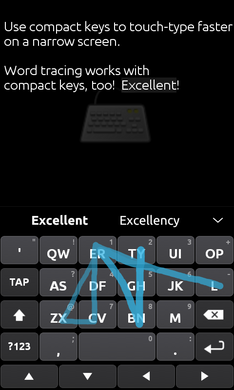
With multi dimensional features TouchPal X Keyboard is super smart, quick and ready to give a better experience of key types and buttons for your smartphone. Check out the highlights of TouchPal X Keyboard in a body

From Google Play Store:
  • Emoji X: Flip up Space for emoji & smileys, 500+ extended emojis
  • TouchPal Cloud
  • TouchPal Wave - Sentence gesture, use simple gestures to input commonly used phrases/sentences
  • TouchPal Curve® - Word gesture 
  • Sliding up or down gesture to input number or symbol 
  • Contextual prediction, 
  • Save > 90% of keystrokes
  • Learns your Tweets/messages/contacts to personalize candidate outputs
  • Walkie-Talkie style voice input
  • T+ dual-letter layout: Bigger keys than QWERTY
Price: Free

SwiftKey Keyboard

SwiftKey Keyboard
SwiftKey Keyboard conquers the No.1 best-selling app in 58 Google Play countries, over 200,000 ***** reviews. The keys are swift work as a mind reading keyboard and it makes touchscreen typing faster, easier and more personalized. It's smart and learning coefficient modded. SwiftKey cloud: connected & seamless across devices. 

Price: $5.00 (Current)

Jelly Bean Keyboard

Jelly Bean Keyboard
A Swiftkey's alternative android keyboard now includes split keyboard for thumb typing. Jelly Bean Keyboard is the best port of Jelly Bean Keyboard on the market!

Features from Google Play:
  • Learns from typing history, the more you type with this keyboard, the predictions will get faster and smarter!
  • Compatible with most android devices
  • Features that are incompatible with older phones were removed to make the keyboard faster
  • Bigger Keys!
  • Reduced app size by exporting non-English languages as separate downloads
  • More user friendly
  • Enjoy!
 Price: Free

A.I.type Keyboard Free

A.I.type Keyboard Free
The best keyboard on the Android Market! It’s smart! The keyboard suggests your next word, completes your current word and corrects your typos based on the context of what you are writing (limited to 14 days on free version). It gets smarter! As you type, the keyboard learns your common words, phrases and style, and improves its text prediction accordingly.

Price: Free

Swype Keyboard Free

Swype Keyboard Free
Double your smartphone key typing features with Swype Keyboard has now been available for Android for a long time now, and you’ll even find it pre-installed on some Android devices. New Swype is even more powerful and personal! This trial version is good for 30 days.

Swype is all about YOU. Whether you’re a fast tapper, exact typer or a Swype Ninja, get ready for a better, faster keyboard experience that gets smarter the more you use it. Swype pays attention to the way you input text and creates a personal language model that follows you from device to device. Swype – the world’s most powerful keyboard.

Price: Free

Thumb Keyboard

Thumb Keyboard
Thumb Keyboard for Android™ is a keyboard with many, advanced customization options that allows the user to adjust it to his or her preferences. This groundbreaking keyboard introduces a lot of innovations. Besides a standard layout it has a new (patent pending) "split" layout for tablets and phones that makes thumb typing more natural and comfortable. It also introduces a lot of useful and advanced functions that will improve your productivity and makes typing on your mobile device more fun and comfortable.  

Features from Google Play:
  • Full featured standard layouts 
  • Split layouts for tablets and large screen devices: Better accessible keys for thumb-typing on large and small tablets and 4"+ phones 
  • Special tailored layouts for phones, 5" 'phablets', 7" tablets and 9-10" tablets
  • Option to select separate layouts for portrait and landscape
  • One-handed operation mode for large-screen phones
Price: $2.49 (Current)


Tuesday, February 25, 2014

MWC: Nokia Launches X, X+, XL Android Smartphones

Nokia has launched a series of Android devices at MWC 2014, as expected from numerousleaks in the lead up to today's press conference. The low-cost devices are running a forked version of Android laden with Microsoft services, as well as the 'Fastlane' user interface seen on Nokia's Asha line.


The first of the devices are the Nokia X and Nokia X+: both feature 4.0-inch WVGA displays, while the X+ will be slightly beefed up. Internally we're looking at a Qualcomm Snapdragon S4 SoC with a 1.0 GHz dual-core CPU, a 1,500 mAh battery, dual-SIM support, as well as a 3-megapixel fixed-focus camera and a microSD card slot. The X has 512 MB of RAM and 4 GB of storage, while the X+ comes with 768 MB of RAM.

The XL is a larger variant of the X, featuring a 5.0-inch WVGA IPS display, a 2-megapixel front-facing camera and 5-megapixel rear camera with autofocus. Internal hardware in the Nokia XL is the same as the X+, but the battery has been upgraded to 2,000 mAh. All handsets in the series look like a combination of Lumia and Asha devices, with colorful backs and a single front button. 

All devices will have access to Nokia's Android app store, as well as the Yandex app store that will suggest apps Nokia's store doesn't have. Sideloading APK files will be supported, although some apps may not function correctly due to the lack of Google Mobile Services in the forked OS running on the phones.


The Nokia X will be available "immediately" for €89 (~$120), while Q2 will see the launch of the the Nokia X+ for €99 (~$135) and Nokia XL for €109 (~$150).


Monday, February 10, 2014

Nokia Set to Release its first Android-Based Smartphone this Month

Nokia will release its first Android smartphone this month. According to The Wall Street Journal. The device codenamed as Nokia Normandy, the low-cost handset will reportedly be showcased during MWC in Barcelona.


According to WSJ’s sources, Nokia work so hard on the device while Microsoft was performing due diligence prior to its acquisition of the Finnish company. The smartphone will allegedly go official as Nokia X.

Unsurprisingly, the smartphone is tipped to launch without Google Play support, Applications such as Twitter, Facebook, Skype, Vine and BBM are said to run on the OS with a separate app store - similarly to Amazon’s Kindle products. It is not certain how many apps will be available. Instead, it will be focused on services provided by Microsoft and Nokia. In line with recent leaks, the UI of the upcoming smartphone is also said to be closely related to Microsoft’s Windows Phone 8.

The leaked press renders and images of the Nokia X show a phone styled in a similar way to Nokia's Lumia devices, including the usual range of vibrant color choices. The phone is rumored to include dual-core Snapdragon 200 SoC, dual-SIM, 4” WVGA display, packing just 512 MB of RAM and 4 GB built-in memory. The smartphone will reportedly be priced in line with Nokia Asha devices.

For any more details on what the device will be offering, we might just have to wait until it's unveiled at the end of the month.


Leaked Photos of Nokia's Prototype Android Smartphone

There has been a rumour spreading like wildfire about the upcoming release of the new Nokia Android-based Smartphone and this rumour seems unstoppable.

Many people are talking about its much awaited release that could happen anytime this month. Others have been saying that the device will be called the Normandy while some say that it will be called Nokia X.

Though, the Nokia’s mobile devices and services sections have already been acquired by Microsoft, there is still a huge possibility that the release of the Nokia Android mobile phone will be pushing through. In fact, the device might be unveiled to the market this February at the Mobile World Congress in Barcelona. There is no official confirmation yet, but it looks as though as more images of the Smartphone have now popped up online. 


The images above do not really show many new details about the hardware or give much insight on its feature set, but we do get to see the display turned on in one of them with a possible peak at what the device's UI could look like. Both images have been described as picturing engineering prototypes of the device. As some have suggested it will most likely be a low-end device that runs a custom version of Android, with a UI that incorporates ideas from both Windows Phone and Nokia's Asha line.

At this point, there seems to be no certainty that the phone will see the light of day, especially considering the fact that Nokia's focus on Windows Phone projects and Microsoft's involvement in the company moving forward. Nokia was reported to have begun early stage development on Android-based smartphones before being acquired by Microsoft, at the point which many felt the Normandy project would get buried. There is a possibility that these images could be old, but only time will tell if Nokia is still tinkering around with Google software while Microsoft is looking over its shoulder.


Best Android Secret Tricks and Tips

Android's plenty options and features are very much enough to overwhelm even smartphone veterans. For every feature you know, there is another that can help you do something new with your android devices. I once posted lists of android mobile codes days back and today, this article will take you through ways to optimize your Android's performance with personalized shortcuts, search boxes and widgets.
Read on to know what i am talking about...

Note: These codes are used only by technicians, So be careful with them and use it at your own risk. 

  • Force reboot:
Many times android users face a problem of freezing of mobile phone, In case your android phone is frozen, you can reboot it using an android trick.

Just press Power Button+ Home Key + Volume up button simultaneously.

  • Quick Google Access:
Android phones built primarily for internet, many of android users don’t know that android phones provide a way by which we can access Google search in just a single click. To use this android trick,

Press menu key and hold it for couple of seconds, it will launch the Google search.

  • Reboot Android in Safe Mode:
As like computers, we can also reboot android phones in safe mode. The latest android jelly bean version provides an option to reboot in safe mode, if something goes wrong.
To reboot your android in safe mode, follow the below given instructions.

*Long press the power button
*Long press on the power off option.


Android phone will show a confirmation message about rebooting it in safe mode, if we reboot android phone in safe mode then all the 3rd party application will be disabled. These applications can again be enabled when we reboot our phone normally. This is a great android utility in case when, one of your 3rd party application is causing trouble for you and you want to hunt it.

  • Unlock android phones by face detection:
This is one cool android trick by which you can unlock your phone by using face detection, In the jelly bean version, android provides a way by which android phone can be unlock using face detection, to make this feature more secure, jelly bean version added another layer of protection in which android phone can be unlocked only when the face is matched as well as we have to blink eyes in order to unlock phone. Blinking eyes tells the android security system that person is live and it’s not an illegal attempt of unlocking using a still image.
To achieve this,

Go to Settings > Security > Screen lock > Face unlock.

  • Get detailed information about phone status:
We can get the detailed statistics like phone information, battery information, usage statistics and WiFi information by just dialing *#*#4636#*#*

This is a handy USSD to get the details about battery usage, DNS check, Ping, Application time usage time and so on.

  • Move android apps to SD card:
Its a good idea to install android apps in SD card, but what if you installed apps on your phone memory?. Don’t worry, android phones provide a way by which we can move our apps to SD card. To move apps to SD card, follow these steps:

Go to settings > Application settings > Manage application > Select the application, You will see the option “Move to SD card”.
  • Hard Reset and Factory reset your android phone:
This android trick comes handy at the time of selling an android phone. Android phone can be formatted in two ways

FACTORY RESET
HARD RESET


a) Factory reset: In factory reset, your phone is being formatted to factory level. Means all the settings will go by default and all the internal data will be deleted. To factory reset a phone dial *#*#7780#*#*.

b) Hard reset: To hard reset a phone dial *2767*3855#, this will delete all the data (including internal and External SD data) as well as settings of android phone. Don’t try this code for testing purpose, until you are not sure. It will not ask for a confirmation.

Context menu in android:
long press on the screen, will show you additional options for customizing android phones. This context menu is somewhat similar to the right click menu of most operating systems.

  • Taking screen shots on android phone:
Android phones offers a great feature in which we can take the screen shot without using any third party application. However the screen shot android trick varies from one android version to another version.

Press the Home button + power button (This trick work on most android phones.)
For Galaxy Nexus: Power button + volume down button.
For Galaxy Note 2 and S3: Swipe your palm on the screen to take screen shot.

  • Android Version Animation:
Here is another cool android trick to play with on your android phone.
To make use of this android trick, Go to settings > about phone > Tab repeatedly on ‘Android version’.
After sometime, the android version will be animated.


Monday, February 3, 2014

The Motorola Moto G Handles Water like a Champion: 30 Minutes Underwater

You would never think that an affordable offering such as the Motorola Moto G with no IP rating or anything will survive being submerged under water for even a few second. When Motorola said it’s wrapping the insides of the phone with a water-resistant nano-coating, many though that’s more of a marketing trick, than anything else.


That’s certainly not the case, as YouTube reviewer Erica Griffin has discovered. In fact the phone dived under water for a nudge over 40 minutes and the result is quite shocking.

The Moto G survived a 15-second dip and was virtually unaffected by it. Then, a 10-minute dive followed, which resulted in a random crashes, but no issues with the overall functionality. The display, camera, loudspeaker, Wi-Fi and 3G connectivity were working as if nothing happened.

But Erica didn’t stop here, as she wanted to see what would happen if the Moto G enjoyed a 30-minute bath. Amazingly, after letting the phone dry for a couple of seconds and the water to get out, everything was fully operational. The battery does get a bit warm at some point, but not really hot. Granted, there was some condensation underneath the camera lens, but after a full night’s rest – the Moto G operated as if it were just unboxed.

The upshot is that the Moto G is really fully water-proof and doesn’t mind taking long or short baths every now and then.

Source | Via